SQL Server restore script from backup(Full,Differential,Log) files in a directory
ProblemOne of the ongoing challenges of a DBA is to backup and restore databases. Backups are done on an automated schedule, but restores can take on many different versions, you may need to restore a production database, restore a development or test database or just create another copy of the database somewhere else. There are several ways of automating the restore process and creating a script, but this approach shows a way this can be done by just reading the contents of a directory for the backup files that exist.
SolutionThe following is one simple approach of reading the contents of a directory and creating the restore commands that need to be issued to restore the database. This script will work for full, differential and transaction log backups.
Before we get started the script below assumes the following:
USE Master; GO SET NOCOUNT ON
-- 1 - Variable declaration DECLARE @dbName sysname DECLARE @backupPath NVARCHAR(500) DECLARE @cmd NVARCHAR(500) DECLARE @fileList TABLE (backupFile NVARCHAR(255)) DECLARE @lastFullBackup NVARCHAR(500) DECLARE @lastDiffBackup NVARCHAR(500) DECLARE @backupFile NVARCHAR(500)
-- 2 - Initialize variables SET @dbName = 'Customer' SET @backupPath = 'D:\SQLBackups\'
-- 3 - get list of files SET @cmd = 'DIR /b ' + @backupPath
INSERT INTO @fileList(backupFile) EXEC master.sys.xp_cmdshell @cmd
-- 4 - Find latest full backup SELECT @lastFullBackup = MAX(backupFile) FROM @fileList WHERE backupFile LIKE '%.BAK'
AND backupFile LIKE @dbName + '%'
SET @cmd = 'RESTORE DATABASE ' + @dbName + ' FROM DISK = '''
+ @backupPath + @lastFullBackup + ''' WITH NORECOVERY, REPLACE' PRINT @cmd
-- 4 - Find latest diff backup SELECT @lastDiffBackup = MAX(backupFile) FROM @fileList WHERE backupFile LIKE '%.DIF'
AND backupFile LIKE @dbName + '%'
AND backupFile > @lastFullBackup
-- check to make sure there is a diff backup IF @lastDiffBackup IS NOT NULL BEGIN
SET @cmd = 'RESTORE DATABASE ' + @dbName + ' FROM DISK = '''
+ @backupPath + @lastDiffBackup + ''' WITH NORECOVERY'
PRINT @cmd
SET @lastFullBackup = @lastDiffBackup END
-- 5 - check for log backups DECLARE backupFiles CURSOR FOR
SELECT backupFile
FROM @fileList
WHERE backupFile LIKE '%.TRN'
AND backupFile LIKE @dbName + '%'
AND backupFile > @lastFullBackup
OPEN backupFiles
-- Loop through all the files for the database FETCH NEXT FROM backupFiles INTO @backupFile
WHILE @@FETCH_STATUS = 0 BEGIN
SET @cmd = 'RESTORE LOG ' + @dbName + ' FROM DISK = '''
+ @backupPath + @backupFile + ''' WITH NORECOVERY'
PRINT @cmd
FETCH NEXT FROM backupFiles INTO @backupFile END
CLOSE backupFiles DEALLOCATE backupFiles
-- 6 - put database in a useable state SET @cmd = 'RESTORE DATABASE ' + @dbName + ' WITH RECOVERY' PRINT @cmd
If you run the above code in a query window, assuming the listed files above existed, you will get the following output. At this point you can copy and paste this code into another query window and run the query to do the actual restore.
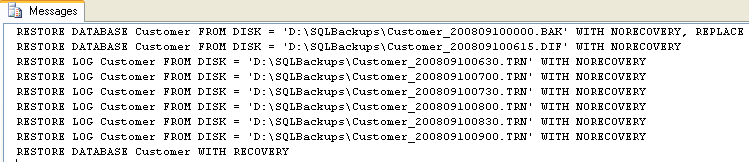 As you can see it does a Full restore, the latest Differential restore and all Transaction Logs after that. The script also does a WITH RECOVERY at the end to put the database in a useable state.
SolutionThe following is one simple approach of reading the contents of a directory and creating the restore commands that need to be issued to restore the database. This script will work for full, differential and transaction log backups.
Before we get started the script below assumes the following:
- The restored database will have the same name as the backed up database
- The restored database will be restored in the same location as the backed up database
- The files have the following naming format
- dbName_YYYYMMDDHHMM.xxx
- File extensions are as follows
- Full backup – BAK
- Differential backup – DIF
- Transaction log backup – TRN
- XP_CMDSHELL is enabled
- There are no missing transaction logs that may break the restore chain
- Full backups at midnight
- Differential backups every 3 hours starting at 3:15am
- Log backups every 30 minutes starting at 1am
- Customer_200809100000.BAK
- Customer_200809100100.TRN
- Customer_200809100130.TRN
- Customer_200809100200.TRN
- Customer_200809100230.TRN
- Customer_200809100300.TRN
- Customer_200809100315.DIF
- Customer_200809100330.TRN
- Customer_200809100400.TRN
- Customer_200809100430.TRN
- Customer_200809100500.TRN
- Customer_200809100530.TRN
- Customer_200809100600.TRN
- Customer_200809100615.DIF
- Customer_200809100630.TRN
- Customer_200809100700.TRN
- Customer_200809100730.TRN
- Customer_200809100800.TRN
- Customer_200809100830.TRN
- Customer_200809100900.TRN
- Customer_200809100000.BAK
- Customer_200809100615.DIF
- Customer_200809100630.TRN
- Customer_200809100700.TRN
- Customer_200809100730.TRN
- Customer_200809100800.TRN
- Customer_200809100830.TRN
- Customer_200809100900.TRN
USE Master; GO SET NOCOUNT ON
-- 1 - Variable declaration DECLARE @dbName sysname DECLARE @backupPath NVARCHAR(500) DECLARE @cmd NVARCHAR(500) DECLARE @fileList TABLE (backupFile NVARCHAR(255)) DECLARE @lastFullBackup NVARCHAR(500) DECLARE @lastDiffBackup NVARCHAR(500) DECLARE @backupFile NVARCHAR(500)
-- 2 - Initialize variables SET @dbName = 'Customer' SET @backupPath = 'D:\SQLBackups\'
-- 3 - get list of files SET @cmd = 'DIR /b ' + @backupPath
INSERT INTO @fileList(backupFile) EXEC master.sys.xp_cmdshell @cmd
-- 4 - Find latest full backup SELECT @lastFullBackup = MAX(backupFile) FROM @fileList WHERE backupFile LIKE '%.BAK'
AND backupFile LIKE @dbName + '%'
SET @cmd = 'RESTORE DATABASE ' + @dbName + ' FROM DISK = '''
+ @backupPath + @lastFullBackup + ''' WITH NORECOVERY, REPLACE' PRINT @cmd
-- 4 - Find latest diff backup SELECT @lastDiffBackup = MAX(backupFile) FROM @fileList WHERE backupFile LIKE '%.DIF'
AND backupFile LIKE @dbName + '%'
AND backupFile > @lastFullBackup
-- check to make sure there is a diff backup IF @lastDiffBackup IS NOT NULL BEGIN
SET @cmd = 'RESTORE DATABASE ' + @dbName + ' FROM DISK = '''
+ @backupPath + @lastDiffBackup + ''' WITH NORECOVERY'
PRINT @cmd
SET @lastFullBackup = @lastDiffBackup END
-- 5 - check for log backups DECLARE backupFiles CURSOR FOR
SELECT backupFile
FROM @fileList
WHERE backupFile LIKE '%.TRN'
AND backupFile LIKE @dbName + '%'
AND backupFile > @lastFullBackup
OPEN backupFiles
-- Loop through all the files for the database FETCH NEXT FROM backupFiles INTO @backupFile
WHILE @@FETCH_STATUS = 0 BEGIN
SET @cmd = 'RESTORE LOG ' + @dbName + ' FROM DISK = '''
+ @backupPath + @backupFile + ''' WITH NORECOVERY'
PRINT @cmd
FETCH NEXT FROM backupFiles INTO @backupFile END
CLOSE backupFiles DEALLOCATE backupFiles
-- 6 - put database in a useable state SET @cmd = 'RESTORE DATABASE ' + @dbName + ' WITH RECOVERY' PRINT @cmd
If you run the above code in a query window, assuming the listed files above existed, you will get the following output. At this point you can copy and paste this code into another query window and run the query to do the actual restore.
Labels: Differential, Log) files, Restore script from backup(Full
posted by JP Chauhan @ 02:36
0 Comments


0 Comments:
Post a Comment
Subscribe to Post Comments [Atom]
<< Home